
What separates a modern AI haircut simulator from old sticker filters
Older virtual haircut apps pasted a flat PNG wig over your forehead. The edges looked stiff, the hair ignored your lighting, and the silhouette never matched the shape of your jaw or shoulders.
A modern AI haircut simulator studies your face proportions, head tilt, and ambient light before rendering the new silhouette. Instead of floating on top of your photo, layers wrap naturally around your cheekbones, neck, and clothing—giving you a realistic sense of whether a shorter or more textured cut balances your features.

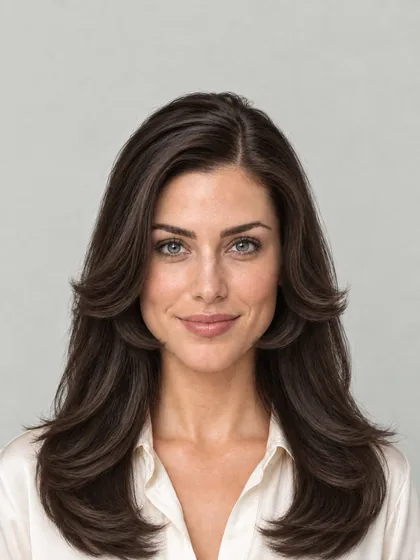

Curated style references available inside Cozalume for iPhone.
Test 120+ Haircuts on Your Own Selfie
Skip guesswork and flat sticker overlays. Preview curated cuts for women and men directly on iPhone with Cozalume.
Five high-impact haircut families worth simulating first
Inside Cozalume, you can browse 120+ curated hairstyles organized by length, texture, and silhouette. If you are planning a noticeable change, start by comparing cuts across these five categories:
- Layered & movement cuts: Compare a soft Butterfly Cut against a shaggier Wolf Cut to see how face-framing layers sit around your chin and collarbone.
- Bobs & pixies: Test where a French Bob, Italian Bob, or Long Pixie hits relative to your jawline before committing to a major chop.
- Fringe & bangs: Preview Curtain Bangs or wispy fringe without risking months of awkward grow-out.
- Texture shifts: Considering a digital perm or diffuser routine? Try a curly hair filter to preview how added volume changes your overall silhouette.
- Short & men's cuts: Compare clean Taper Fades, textured crops, and medium brushed-back styles to judge crown height and side tightness.
How to take the best selfie for an accurate haircut preview
Your input photo determines 80% of how believable any haircut simulator looks. Before uploading a selfie inside Cozalume, follow four quick steps:
- Face a soft window: Even front light prevents harsh shadows across your forehead and cheeks.
- Look straight at the lens: Hold the camera at eye level rather than shooting from high above or below.
- Pull loose hair off your face: Tie long hair back or tuck it behind your ears so the simulator can read your true jawline and hairline—especially when testing shorter cuts.
- Keep the background uncluttered: A plain wall makes edges around fine strands and bangs render much cleaner.
Want to minimize facial drift across tries? Read our full checklist on trying AI hairstyles without changing your face.
How to use your previews at a real salon appointment
Stylists love clear visual references—especially when they show the exact length on your face rather than a celebrity with a completely different bone structure. Save your top two or three Cozalume previews to your iPhone camera roll and point out specifically what you like: where the shortest layer lands, how heavy the fringe looks, and whether you want the ends blunt or feathered.
If you are also thinking about updating your shade at the same appointment, pair your cut preview with our AI hair color changer guide so your cut and color work together.
Frequently Asked Questions
Can I use a haircut simulator app on iPhone before visiting my salon?
Yes. Cozalume runs natively on iPhone (iOS 17+) and lets you preview 120+ curated cuts on your own selfie, then save high-clarity images straight to Photos to share with your stylist.
Does Cozalume work for both women's and men's haircuts?
Yes. Cozalume's curated catalog includes women's long layers, bobs, pixies, bangs, and curly cuts alongside men's taper fades, textured crops, and classic short hairstyles.
Why do some haircut previews look better than others on the same photo?
Strong side shadows, heavy sunglasses, or loose hair covering your forehead make it harder for any AI model to blend a new hairline. A front-facing, well-lit selfie with hair pulled back gives the cleanest preview.
Should I test hair color at the same time as a new haircut?
Testing them separately first makes decisions easier. Lock in your favorite silhouette (length and framing), then explore blonde, brunette, highlights, or silver shades using the Hair Color studio.
